Help
Questions, problems or ideas? Write to support@h1ko.com. We usually reply within two business days.
Pairing two phones
One of you starts a new countdown and gets a six-digit code. The other taps “Enter code” and types it in. The code is valid for 7 days. If it has expired, tap “New code” on the countdown (version 1.0.1 and later) or start a new countdown.
Changing the date
When one of you changes the date, the other phone picks it up the next time the app is opened. The widget follows shortly after.
Adding the widget
Touch and hold an empty spot on the Home Screen, tap “Edit” in the top left, then “Add Widget”, and choose Lovers Countdown.
On your nightstand (StandBy)
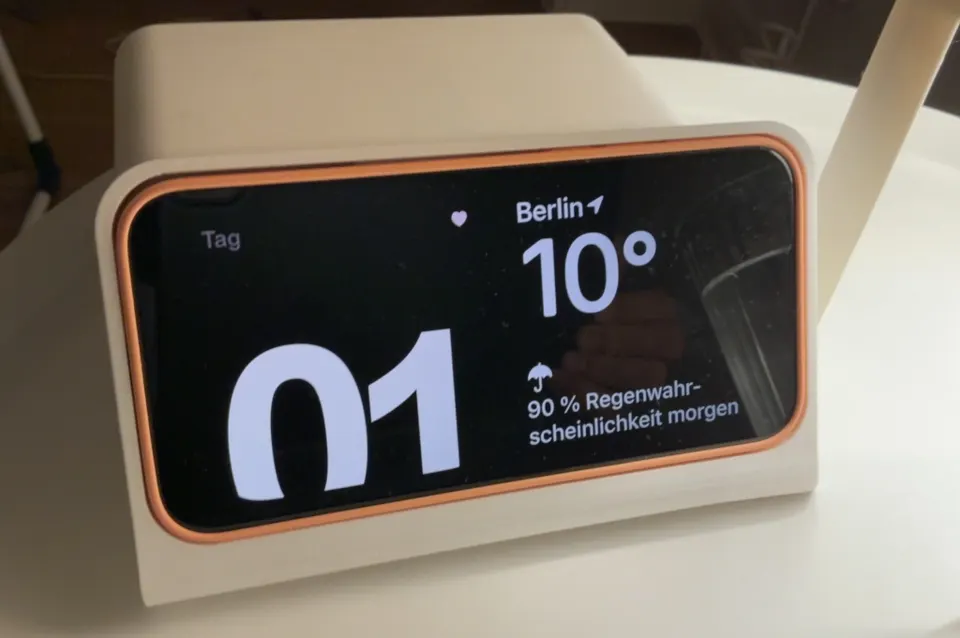
Put your iPhone on the charger, on its side, and lock it. Swipe sideways across the clock, left to right, until two widget columns appear. Touch and hold one column and unlock (Face ID), tap “+”, choose “Lovers Countdown”, then “Done”. At night StandBy shows small widgets side by side; for the big number, leave the app open and tap “Screen on”. If nothing happens, turn on StandBy in your iPhone settings under “StandBy”.
Plus and purchases
One purchase unlocks Plus for both of you. On a new phone or after reinstalling, tap “Restore purchases” in the Plus screen. You can cancel the yearly plan in your Apple Account settings under “Subscriptions”.
Deleting your data
“Leave space” in Settings removes the countdown from this phone. If you also want us to delete your space on the server, just send us a short note. More in the privacy policy.