Lock Screen widget that shows days until you see your partner
Lovers Countdown puts the days until you see your partner on your iPhone Lock Screen, and on your partner’s Lock Screen too, because both phones share one date. You link the two iPhones with a six-digit code, then add the circular, rectangular or inline widget to the Lock Screen. In the last 24 hours the widget switches from days to a running clock.
The three Lock Screen widgets
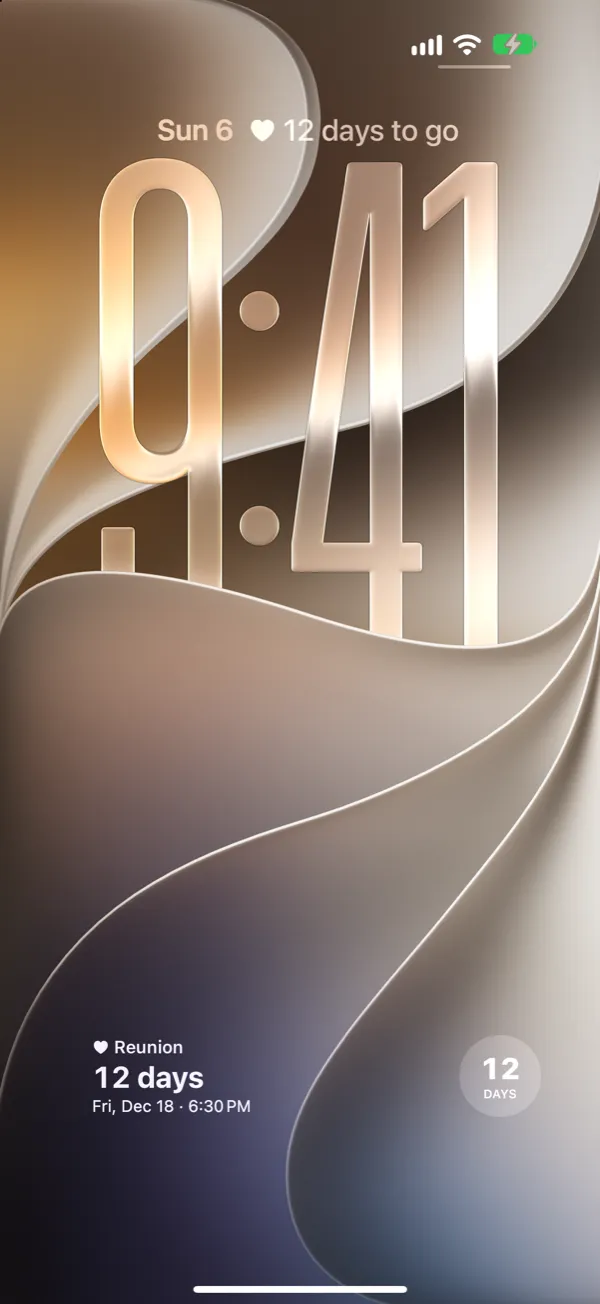
- Circular: the number of days, with “DAYS” underneath. Fits next to other small widgets below the time.
- Rectangular: “♥ Reunion”, the number of days, and the date and time you meet. The widest one, and the one that tells you the most.
- Inline: one line above the clock, next to the date, for example “♥ 12 days to go”.
Lock Screen widgets follow the tint of your Lock Screen, like all iOS Lock Screen widgets. The colored styles of the app (Midnight, Rosé, Sage and others) appear in the Home Screen widget and in StandBy.
How to add the widget
First, both of you need Lovers Countdown on your iPhones and need to be connected: one creates a space, the other enters the six-digit code, and one of you sets the date and time. Our step by step guide to counting down on both iPhones walks through it. Then, on each phone:
- Lock your iPhone and wake the screen.
- Touch and hold the Lock Screen until “Customize” appears, then tap it and choose the Lock Screen.
- Tap the widget area below the time.
- Find Lovers Countdown in the list and tap the circular or rectangular widget.
- For the inline widget, tap the date above the time instead and pick Lovers Countdown.
- Tap “Done”.
Your iPhone needs iOS 16.4 or later.
What happens on the last day
Until the last 24 hours the widget shows days. On the final day it switches to a clock that ticks down in hours, minutes and seconds, on the Lock Screen and on the Home Screen. When the moment arrives, it says “It’s time!”.
Does the widget update on its own?
Yes, the countdown runs by itself. You do not need to open the app every day. If one of you changes the date, the other phone receives it when the app is opened there (within a few seconds if it is already open), and from then on the widget shows the new date.
Home Screen and StandBy too
The same countdown is available as a small or medium Home Screen widget in your chosen style. In StandBy, when your iPhone charges on its side, the widget stays visible on the nightstand. StandBy needs iOS 17.
What it costs
From the moment you pair, both of you get a 7-day trial that includes all widgets, without payment details. After that the countdown keeps running, but the app and the widgets show it again only once one of you buys Plus. One purchase covers both phones: $29.99 once or $14.99 a year in the US, €29.99 or €14.99 in the euro zone. The App Store shows the price for your country.
Can a normal countdown app do this?
General countdown apps also offer Lock Screen widgets. Many of them keep the event on one phone, so your partner has to enter the date separately and update it separately. Lovers Countdown keeps one date for both phones.
FAQ
Which Lock Screen widgets does Lovers Countdown have?
Three: circular (days), rectangular (days plus the date and time you meet) and inline (one line above the clock). There are also small and medium Home Screen widgets, which also appear in StandBy.
Does my partner see the same number on their Lock Screen?
Yes, if they have the app and joined with your code. Both phones count down to the same moment.
Why does my Lock Screen widget not use my chosen style?
iOS shows Lock Screen widgets in the tint of your Lock Screen. Your style shows in the Home Screen widget and in StandBy.
Does the widget show hours and minutes?
In the last 24 hours, yes. It switches from days to a clock with hours, minutes and seconds.
Why does my widget say I need Plus?
After the 7-day trial, the countdown keeps running but stays hidden until one of you buys Plus. Nothing is deleted.
Download Lovers Countdown for iPhone

For iPhone with iOS 16.4 or later. A 7-day trial for both of you, then Plus.